Chrome Extension — Works on All Pinterest Pages

Extract Pinterest Pin Links at Scale

Auto-scroll any Pinterest page, grab all pin URLs, and see real-time engagement stats — saves, likes, shares, and comments — directly on each pin card. Export to CSV, TXT, or clipboard in one click.

10K+ Pins Extracted
5 Export Formats
- Lifetime Access
Pin Link Grabber
Grabbing...
0 Pins Found
0 Scrolls
0 Duplicates
28%
2.4K saves
1.8K likes
892 shares
Add to Chrome
See It In Action

Powerful Extraction, Zero Complexity

See how Pin Link Grabber transforms any Pinterest page into structured, exportable data in seconds.

Step 01

Auto-Scroll & Extract Every Pin

Open any Pinterest page and click "Start Grabbing." The extension auto-scrolls the entire page, using 3 different detection methods to find every pin — including ones hidden deep in infinite scroll.

  • Works on boards, search, feeds & profiles
  • Smart duplicate detection removes repeats
  • 5-speed control from Slow to Turbo
  • Auto-stops when page ends
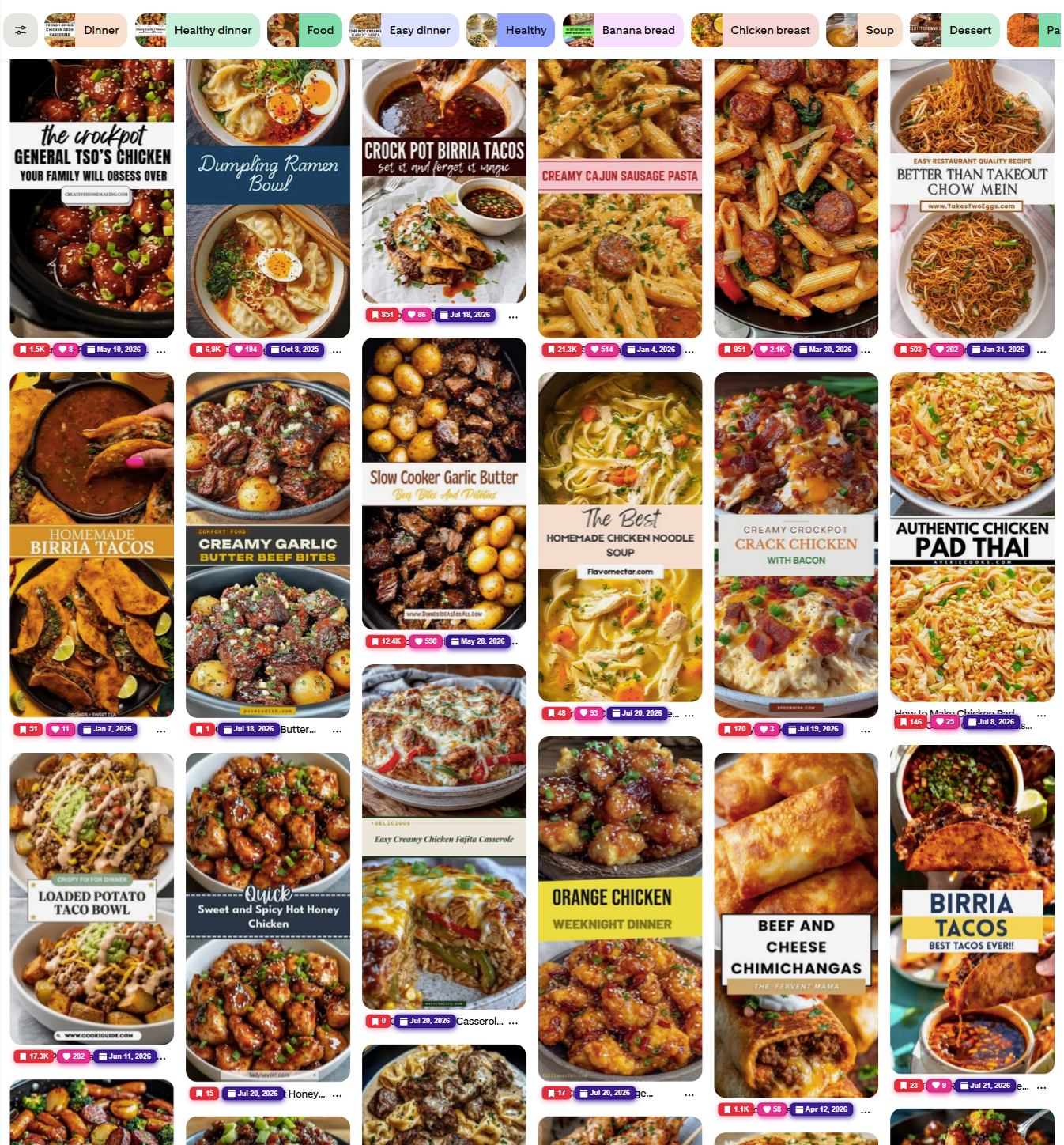
pinterest.com/search/pins/?q=recipes
Pinterest Grid Photo
Pin Link Grabber
Grabbing...
247 Found
18 Scrolls
12 Dupes
▼ 235 passed ● 12 skipped
Sort & Filters ON
Sort By Saves (High → Low)
Min Saves 10+ saves
Export Data
Step 02

Real-Time Engagement Stats

See saves, likes, shares, comments, and creation dates overlaid directly on each pin card. Data pulled from Pinterest's internal API — metrics that aren't normally visible to users.

  • Saves, likes, shares & comment counts
  • Pin creation date on every card
  • Color-coded badges for easy scanning
  • Data from Pinterest's internal API
French Onion Chicken Orzo Casserole
📌 85.5K ❤ 710 📅 Oct 3, 2025
Garlic Butter Steak Bites & Potatoes
📌 23.6K ❤ 7.7K 📅 Apr 21, 2025
Chicken Paprikash — One Pot
📌 398 ❤ 218 📅 Jan 15, 2023
Delicious Beef Lo Mein Noodles
📌 1.4K ❤ 756 📅 Feb 7, 2024
Step 03

Smart Filtering & Sorting

Fine-tune your extraction with powerful filters. Set minimum engagement thresholds, sort by any metric, filter by date range, and control scroll speed — all from the extension popup.

  • Sort by saves, likes, shares, or date
  • Set minimum saves/likes thresholds
  • Filter by creation date range
  • Adjustable scroll speed (5 levels)
Sort & Filters
ON
Enable Filters
Sort By
Order
Min Saves/Likes
Min Shares
Created After
Created Before
Step 04

Export in Any Format

When you're done extracting, export your collected pins with full engagement data. Choose from CSV, TXT, copy to clipboard, or generate a valid RSS XML feed that works with any feed reader.

  • Copy all links to clipboard in one click
  • Download as CSV with all metrics
  • Download as plain text TXT file
  • Generate valid RSS XML feed

EXPORT LINKS

RSS FEED EXPORT

Feed Title
my-pinterest-feed
Output Preview — RSS XML
<rss xmlns:content="http://purl.org/rss/1.0/modules/content/" xmlns:dc="http://purl.org/dc/elements/1.1/" xmlns:atom="http://www.w3.org/2005/Atom" xmlns:media="http://search.yahoo.com/mrss/" xmlns:sy="http://purl.org/rss/1.0/modules/syndication/" version="2.0">
  <channel>
    <title>pinterest-pins</title>
    <link>https://pinterest.com</link>
    <description>RSS feed generated from Pinterest pins</description>
    <lastBuildDate>Sat, 01 Aug 2026 13:57:17 GMT</lastBuildDate>
    <language>en-US</language>
    <sy:updatePeriod>hourly</sy:updatePeriod>
    <sy:updateFrequency>1</sy:updateFrequency>
    <generator>Pinterest Pin Link Grabber Extension</generator>
    <item>
      <title>French Onion Chicken Orzo Casserole</title>
      <link>https://www.pinterest.com/pin/70437490675413</link>
      <guid>https://www.pinterest.com/pin/70437490675413</guid>
      <pubDate>Sun, 05 Oct 2025 16:35:22 GMT</pubDate>
      <description>This French Onion Chicken Orzo Casserole is a cozy, flavor-packed dish combining tender chicken, caramelized onions, and creamy orzo pasta. Topped with melty cheese and baked to bubbly perfection, it’s a one-pan comfort meal that’s perfect for busy weeknights or Sunday dinner with a twist!</description>
      <content:encoded><p><img src="https://i.pinimg.com/originals/d9/8a/d9/d98ad9c0155ac28005fd6c46ada2a61b.png" alt="French Onion Chicken Orzo Casserole" /></p> <p>This French Onion Chicken Orzo Casserole is a cozy, flavor-packed dish combining tender chicken, caramelized onions, and creamy orzo pasta. Topped with melty cheese and baked to bubbly perfection, it’s a one-pan comfort meal that’s perfect for busy weeknights or Sunday dinner with a twist!</p></content:encoded>
      <media:thumbnail url="https://i.pinimg.com/originals/d9/8a/d9/d98ad9c0155ac28005fd6c46ada2a61b.png"/>
      <media:content url="https://i.pinimg.com/originals/d9/8a/d9/d98ad9c0155ac28005fd6c46ada2a61b.png" medium="image"/>
    </item>
    <!-- ... and up to 1,000+ more items dynamically generated ... -->
  </channel>
</rss>
Features

Everything You Need to Extract Pin Data

Powerful extraction engine with real-time analytics, smart filtering, and multiple export formats.

Auto-Scroll & Extract

One-click start — the extension auto-scrolls and uses 3 different methods to find every pin on the page. Smart duplicate detection included.

Live Engagement Stats

See saves, likes, shares, comments, and creation dates overlaid directly on each pin card with color-coded badges. Data pulled from Pinterest's internal API.

Smart Filtering & Sorting

Filter by minimum saves, shares, date range. Sort by engagement metrics. Only collect the pins that match your criteria.

Generate XML RSS Feeds

Turn any Pinterest search, board, or feed into a valid XML RSS feed. You can also export collected pins as CSV, TXT, or copy them to your clipboard.

5-Speed Control

Adjust scroll speed from Slow to Turbo. Set max scroll limits. Auto-stop when the page ends. Full control over extraction pace.

Works Everywhere

Compatible with Pinterest boards, search results, home feed, profile pages, and all international Pinterest domains (.com, .co.uk, .fr, .de, .ca).

How It Works

Up and Running in 3 Simple Steps

No configuration needed. Install, click, and export.

01

Install the Extension

Add Pin Link Grabber to Chrome from the Chrome Web Store. Pin it to your toolbar for easy access.

02

Navigate & Click Start

Go to any Pinterest page — board, search, or feed. Open the extension popup and hit "Start Grabbing." Sit back while it auto-scrolls.

03

Export Your Data

When done, export all pin URLs with engagement data as CSV, TXT, RSS, or copy to clipboard. Filter and sort before exporting.

Pricing

Simple, One-Time Pricing

No subscriptions. No recurring charges. Pay once, use forever.

Loading pricing options...
Secure Payment
SSL Encrypted
Instant Access
FAQ

Frequently Asked Questions

Your free 24-hour trial starts automatically when you install the extension — no signup or license key needed. After it expires, the extension will prompt you to upgrade to the Lifetime plan for just $15. Your collected data won't be lost — you just need to activate a paid license to continue using the tool.

Yes! The $15 lifetime plan is a single, one-time payment. No subscriptions, no recurring charges, no hidden fees. You get lifetime access to all features and future updates.

We accept all major credit/debit cards through Stripe (Visa, Mastercard, Amex) and PayPal. Both options are available on the checkout page.

The extension works on all Pinterest page types: boards, search results, home feed, profile pages, and related pins. It supports pinterest.com, pinterest.co.uk, pinterest.fr, pinterest.de, and pinterest.ca.

The extension intercepts Pinterest's internal API responses to extract engagement metrics (saves, likes, shares, comments, creation date) that aren't normally visible. This data is displayed as color-coded badges on each pin card.

That's why we offer a free 24-hour trial — it starts automatically the moment you install the extension, so you can test all features before buying. Since it's a digital product with instant delivery, we generally don't offer refunds, but reach out if you have issues and we'll help.